Can Overheating Damage Your SSD or Hard Drive?
Yes. Overheating can permanently damage both solid state drives (SSDs) and hard disk drives (HDDs). While modern drives are designed to tolerate temporary temperature spikes, prolonged exposure to excessive heat accelerates wear, increases the risk of data corruption, and can lead to complete drive failure. If your computer regularly runs hot, addressing the cooling problem early is one of the best ways to protect your data.
At PC Geeks, we help homeowners and businesses throughout Frisco, TX diagnose overheating issues before they become expensive data recovery emergencies. Whether your computer is running unusually hot, making strange noises, or slowing down during everyday tasks, our technicians identify the root cause instead of simply treating the symptoms. From clogged cooling systems to failing fans and aging storage drives, we focus on protecting both your hardware and the irreplaceable data stored on it. Our goal is to help you extend the life of your computer while giving you confidence that your important files remain safe.
How Heat Affects SSDs and Hard Drives Over Time
Many people assume only processors suffer from overheating, but storage devices are also sensitive to excessive temperatures.
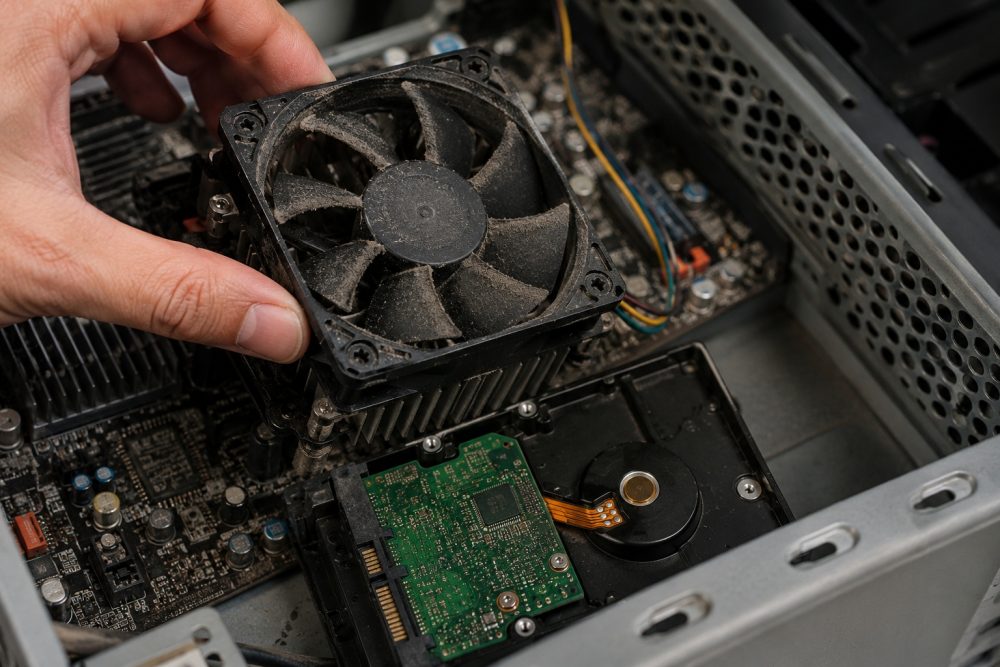
Both HDDs and SSDs generate heat during normal operation. When cooling systems become clogged with dust, fans fail, or airflow is restricted, temperatures can rise well beyond their optimal operating range. Over time, this extra heat places additional stress on internal components.
According to Backblaze, one of the world’s largest cloud storage providers, maintaining proper ventilation and monitoring drive health are important factors in maximizing storage reliability and minimizing drive issues.
Why does overheating shorten a storage drive’s lifespan?
The short answer is that heat accelerates wear.
For hard drives (HDDs), excessive temperatures can:
- Increase mechanical wear on spinning platters and read/write heads
- Cause internal components to expand and contract repeatedly
- Raise the likelihood of read and write errors
- Reduce long-term reliability
For solid state drives (SSDs), heat can:
- Speed up flash memory degradation
- Reduce the lifespan of memory cells
- Trigger thermal throttling that slows performance
- Increase the chance of data corruption during heavy workloads
Although SSDs have no moving parts, they are not immune to heat damage.
What are the warning signs your storage drive may be overheating?
Your computer often provides warning signs before complete failure occurs.
Watch for symptoms such as:
- Frequent freezing
- Slow file transfers
- Unexpected crashes
- Blue screen errors
- Clicking or grinding noises from an HDD
- Programs taking much longer to open
- Files becoming corrupted
- SMART drive warnings
- The computer becoming unusually hot during normal use
If several of these symptoms appear together, it is important to stop ignoring them. Continuing to use an overheating drive can make professional data recovery much more difficult.
Can Frisco’s summer heat contribute to computer overheating?
Yes, especially during North Texas summers.
Frisco regularly experiences extended periods with temperatures well above 95 degrees. When homes, garages, or offices become warmer, computers must work even harder to stay cool.
Common local situations include:
- Desktop computers placed inside enclosed cabinets
- Laptops used outdoors or inside parked vehicles
- Dust accumulation from ongoing construction in rapidly growing neighborhoods
- Reduced airflow in home offices
Even if your air conditioner is running, a dusty cooling system or blocked vents can trap enough heat to damage sensitive components.
How to Prevent Heat Damage to Your Storage Drive
Fortunately, most overheating problems are preventable.
Keep your computer clean
Dust is one of the biggest causes of overheating.
Cleaning fans, heatsinks, and air vents every few months helps maintain proper airflow.
Avoid blocking ventilation
Never place a laptop directly on blankets, pillows, or other soft surfaces.
Desktop towers also need several inches of clearance around intake and exhaust vents.
Monitor temperatures
Free system monitoring software can alert you when internal temperatures begin climbing higher than normal.
Monitoring is especially useful for gaming PCs, workstations, and computers used for video editing.
Replace failing cooling components
Cooling fans eventually wear out.
If your fan becomes noisy, stops spinning consistently, or your computer frequently overheats, replacing the fan is far less expensive than replacing a failed storage drive.
Back up important files
No storage device lasts forever.
According to Backblaze’s ongoing drive reliability research involving hundreds of thousands of drives, storage devices can and do fail unexpectedly despite improvements in overall reliability. Regular backups remain the best protection against permanent data loss.
When should you have your computer inspected?
You should schedule a professional inspection if:
- Your computer frequently overheats
- The fan constantly runs at maximum speed
- You notice burning odors
- The system randomly shuts down
- Your drive health software reports errors
- Performance suddenly declines without explanation
Early diagnosis often prevents complete storage failure and can save significant time, money, and frustration.
Frequently Asked Questions
Can an SSD fail from overheating?
Yes. Prolonged exposure to high temperatures accelerates wear on flash memory cells, reduces performance, and may eventually lead to permanent failure.
Does overheating erase my files immediately?
Usually not. Heat damage typically develops gradually, but continued overheating increases the likelihood of corrupted files or sudden drive failure.
Can a failing cooling fan damage my hard drive?
Yes. A broken or inefficient cooling fan allows heat to build inside the computer, placing additional stress on the storage drive and other internal components.
Can a computer repair shop tell if my drive is overheating?
Yes. Professional technicians can monitor drive temperatures, review SMART health data, inspect cooling systems, and identify whether overheating is contributing to drive problems.
Protect Your Data Before Heat Causes Permanent Damage
An overheating computer is more than an inconvenience. It can quietly reduce the lifespan of your SSD or hard drive and eventually put your valuable files at risk. If your computer is running hotter than usual, making unusual noises, or showing signs of storage problems, don’t wait until the drive fails completely.
Ready to protect your data and extend the life of your computer? Contact PC Geeks today for professional computer diagnostics and storage drive inspections in Frisco, TX.