
Can the Freezer Trick, Rice, or Other DIY Data Recovery Methods Make a Failed Drive Worse?
Yes. Putting a hard drive in the freezer, placing wet electronics in rice, repeatedly powering up a failing drive, or attempting unproven DIY repairs can make data loss worse and reduce the chances of successful recovery. If important files are at risk, the safest response is usually to stop using the device, power it down, and have it professionally evaluated.
When photos, business documents, tax records, or years of personal files suddenly disappear, it is understandable to search for a quick fix. Unfortunately, the internet is full of data recovery myths that can turn a recoverable problem into permanent data loss. PC Geeks helps Frisco-area customers diagnose computer and hard drive problems without relying on risky shortcuts. As a local, family-owned computer repair company, PC Geeks performs its repair work in-house and provides data recovery for desktop and laptop hard drives. The goal is simple: determine what actually went wrong, protect the data that may still be recoverable, and recommend the safest next step.
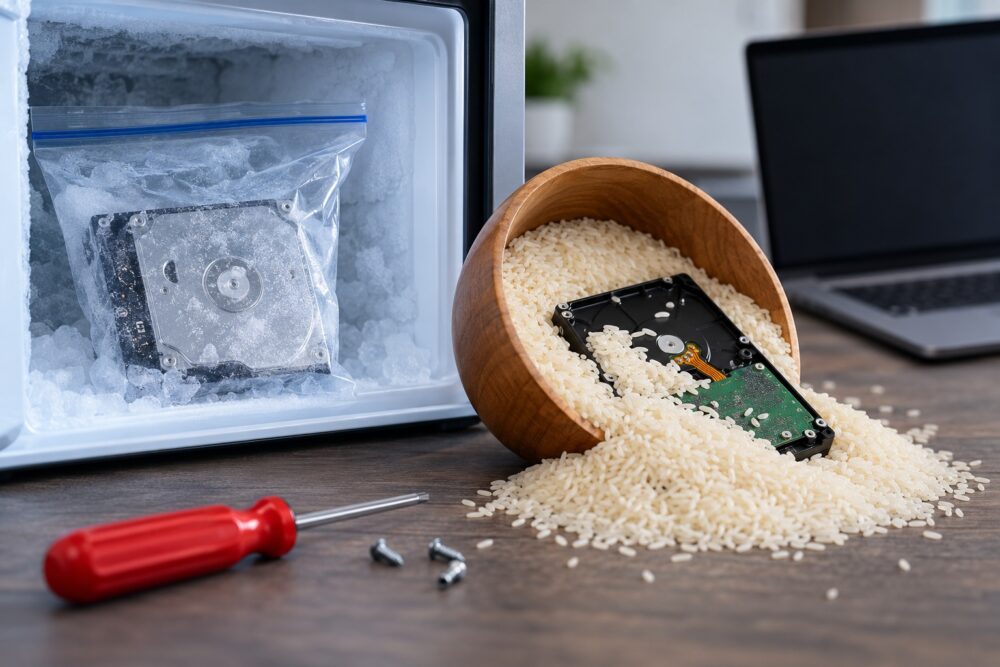
Common Data Recovery Myths That Can Put Your Files at Risk
The most important rule after suspected drive failure is to avoid making the problem worse. A logical problem, such as deleted files or file-system corruption, is very different from physical damage involving a hard drive’s mechanical components. What seems like a harmless internet trick may create additional problems before a technician ever sees the device.
Does Putting a Hard Drive in the Freezer Really Work?
No, putting a failing hard drive in a freezer is not a safe data recovery method. The so-called “freezer trick” comes from anecdotes about older mechanical hard drives temporarily becoming accessible after cooling. Even if a particular drive briefly responds afterward, that does not make freezing a reliable or safe recovery technique.
One major concern is moisture. Moving an extremely cold drive into warmer air can create condensation. Moisture and sensitive electronic or mechanical components are a bad combination.
If a hard drive is clicking, grinding, disappearing from the computer, or failing to spin up normally, avoid experimenting with temperature changes. Power it down and have the problem diagnosed instead.
Professional data recovery guidance follows the same cautious principle. Ontrack advises users not to turn on devices suspected of severe physical damage and to shut them off immediately if they produce ticking sounds.
Does Putting a Wet Laptop or Drive in Rice Help?
Rice is not an effective repair for liquid-damaged electronics. It may absorb some moisture from the surrounding air, but it does not remove liquid contaminants or address corrosion occurring inside a computer, phone, or storage device.
iFixit specifically advises users to skip rice when dealing with liquid-damaged electronics. Its repair guidance notes that rice and similar desiccants do not remove contaminants left behind by a spill and may allow corrosion-related damage to continue.
If a laptop or external drive gets wet:
- Disconnect external power when it is safe to do so.
- Do not keep turning the device on to “see if it works.”
- Do not use a hair dryer, oven, or other high-heat method.
- Avoid relying on rice as a repair.
- Have the device professionally evaluated, especially when the files are valuable.
This matters in North Texas, where moisture is hardly unusual. National Weather Service climate data for the Dallas-Fort Worth area shows normal annual relative humidity of about 66 percent, while Frisco’s 1991-2020 precipitation normal is 42.08 inches per year.
Can I Keep Restarting My Computer to Get My Files Back?
Repeatedly restarting a computer with a physically failing hard drive can increase the risk of additional damage. If the drive is making unusual mechanical noises, becoming intermittently detectable, or causing the system to freeze, every additional attempt may place more stress on failing components.
One restart after an unexpected software problem is very different from repeatedly forcing a malfunctioning drive to boot. Warning signs that should make you stop include:
- Clicking, ticking, grinding, or unusual mechanical sounds
- A drive that repeatedly disappears from the operating system
- Extremely slow file access combined with errors
- Frequent freezes while accessing the drive
- A computer that no longer recognizes the drive
- Recent impact, liquid exposure, or other physical damage
If the data is irreplaceable, minimizing further use is usually more important than getting the computer to boot one more time.
What DIY Data Recovery Mistakes Should I Avoid?
The biggest mistake is experimenting on the only copy of important data. A recovery attempt that modifies, stresses, or physically alters the original drive can make a professional recovery more difficult.
Avoid these common pieces of bad advice:
- Opening a hard drive yourself: Mechanical hard drives contain extremely sensitive internal components. Opening the enclosure outside an appropriate environment can introduce contamination.
- Freezing the drive: Temperature changes and condensation can create additional risks.
- Hitting, tapping, or shaking it: Physical force is not a repair method and can worsen mechanical damage.
- Repeatedly reconnecting a clicking drive: More operating time can mean more stress on damaged components.
- Running random repair utilities immediately: Software tools may be appropriate for certain logical failures, but they are not a universal solution. Writing changes to a damaged or unstable drive can complicate recovery.
- Formatting when prompted: If a computer says a drive must be formatted before use, do not format it when you need the existing files.
The safest response depends on why the data became inaccessible. Diagnosis should come before recovery attempts.
What Should I Do When a Hard Drive Fails in Frisco, TX?
If the drive contains important data, stop using it and get an evaluation before attempting DIY fixes. That is especially important after physical damage, unusual noises, liquid exposure, or sudden hardware failure.
For Frisco residents and businesses, losing access to a computer can affect far more than convenience. The City of Frisco currently estimates its population at roughly 249,500, and the city’s comprehensive planning materials identify information technology, software, hardware, cybersecurity, artificial intelligence, and analytics among its innovation focus areas. In a growing, technology-dependent community, reliable access to business and personal data matters.
PC Geeks provides data recovery and computer repair from its Frisco location on Main Street, about five minutes from the Dallas North Tollway. The company serves Frisco as well as surrounding communities including Little Elm, Prosper, The Colony, Carrollton, Lewisville, and Plano.
Data Recovery FAQ
Can freezing a hard drive permanently damage it?
It can introduce additional risks, particularly from condensation and temperature changes. The freezer trick is not a recommended substitute for proper diagnosis and professional data recovery.
Should I use rice after spilling water on my laptop?
No. Rice does not remove contaminants left by liquid and does not stop internal corrosion. iFixit specifically recommends skipping rice when dealing with liquid-damaged electronics.
Should I turn on a clicking hard drive to see if it still works?
Avoid repeatedly powering up a drive that is clicking or showing signs of physical failure. Ontrack recommends immediately shutting down a device that produces ticking sounds when physical damage is suspected.
Can deleted files always be recovered?
No. Recovery depends on factors such as the type of storage device, why the files disappeared, whether new data has overwritten them, and whether the device has physical damage. Stopping use quickly can help preserve recovery options.
Protect Your Data Before a Myth Makes the Problem Worse
When important files disappear, doing less can sometimes protect your chances of getting them back. Skip the freezer, forget the bag of rice, and resist repeatedly restarting or experimenting with a failing drive. A proper diagnosis can identify whether the problem is logical, electronic, or mechanical before additional damage occurs.
Ready for professional data recovery in Frisco, TX? Contact PC Geeks today and let an experienced technician evaluate the problem before a DIY fix puts your files at greater risk.